- AJ Products UK
- Our services
- Online quotes
Quick and easy online quotes

Request a quote – quick and easy, directly online!
We believe requesting a quote should be simple and hassle-free. That’s why we’ve made it possible for you to submit a quote request online, completely independently. With our digital request form, you can request a quote at any time, from anywhere. All your quotes are stored in one convenient place, giving you full flexibility and easy access. And best of all, the service is completely free!
Creating a quote request is this simple
1. Make sure you're logged into your business account and add the product(s) you want a quote for to your list.
2. Go to My Pages, where you’ll find all your lists.
3. Click “Request Quote”, check your details, and submit your request.
4. Under My Quotes, you can view all your submitted quotes and track their status.
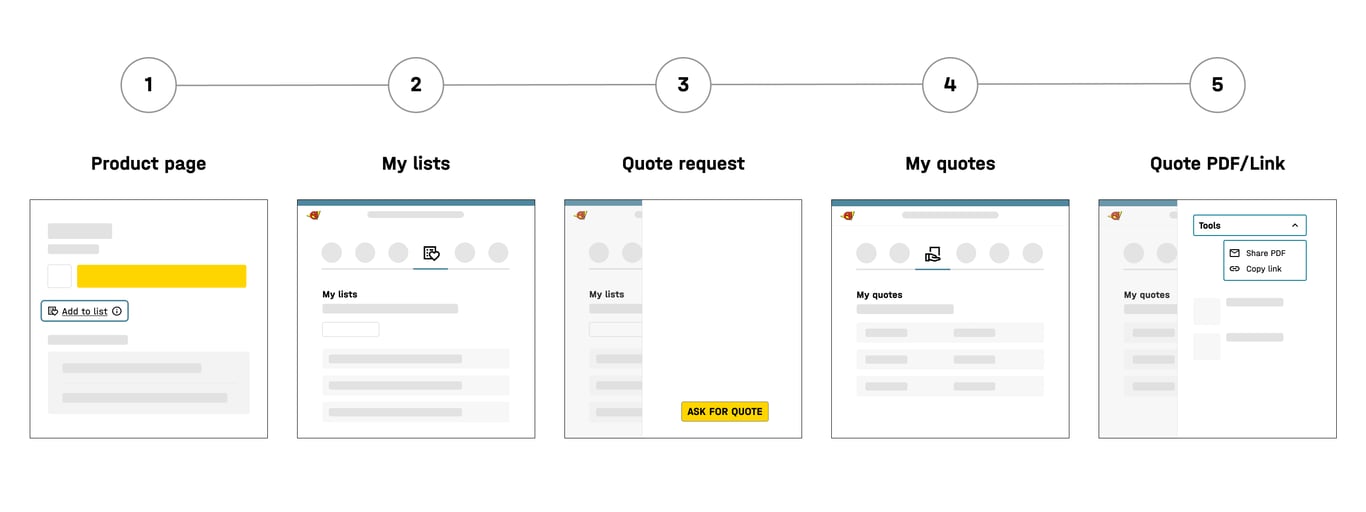
This is how digital quotes work
Use the "Add to List" button found on all our product pages below the "Add to Basket" button. You can save multiple products to the same list, create different lists for separate projects, or even make a list with a single product.
In "My pages" you’ll find the "My lists" tab, where you can view, manage and delete your lists. This is also where you can create a digital quote request - simply open a list and select "Request Quote".
Before sending your request, please check your details and select any additional services you require, such as assembly or delivery to a room of choice. Once that’s done, your quote request is ready to go! We’ll receive it straight away and process it the same day or the next working day.
All your quotes are stored under "My Quotes", including those created with help from one of our sales representatives. You’ll receive an email notification when your quote is ready, and you can place your order directly from the My Quotes tab.
If you’d like a clear overview of your quote, including both images and text, simply click “Share PDF.” You’ll receive a PDF version sent straight to your email, making it easy to print or share with colleagues. You can also share your quote digitally by clicking “Copy link.
Benefits of handling quotes digitally!
- Request a quote at any time of day - even outside office hours.
- No need to call or speak to a salesperson - though you’re always welcome to get in touch if you prefer!
- Completely free of charge.
- Create multiple quotes, view them all in one place, and manage them easily.
- Once your quote is approved, you can head straight to checkout for a quick and seamless purchase.
- Track your request status in real time - it updates automatically when your quote is approved or declined.

Contact us if you need help creating a quote
If you’d like personal assistance with your quote request, please don’t hesitate to contact us. We’re always happy to help!




Chat
Chat with us online
by using the chat box
in the bottom right
Chat with us online
by using the chat box
in the bottom right